
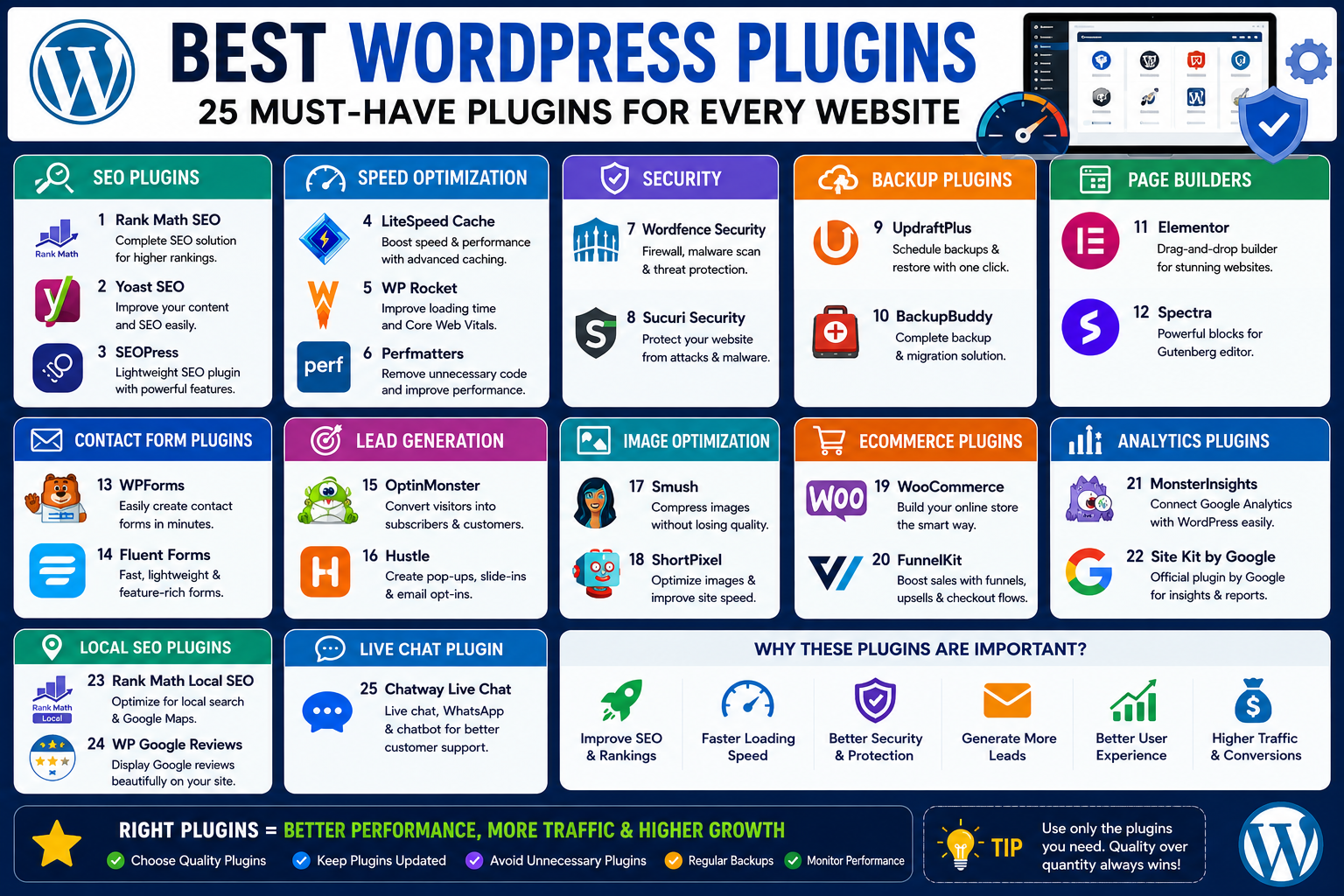
WordPress powers millions of websites worldwide.
From personal blogs to eCommerce stores and business websites, WordPress remains the most popular website platform available.
But what makes WordPress truly powerful?
Plugins.
Plugins allow you to add new features, improve performance, enhance security, boost SEO, generate leads, and create a better user experience without writing a single line of code.
The challenge is that there are thousands of plugins available.
Choosing the wrong ones can slow down your website, create security risks, and negatively impact performance.
That’s why we’ve created this complete guide covering the Best WordPress Plugins in 2026 for SEO, speed optimization, security, lead generation, backups, website design, and business growth.
Whether you’re running a blog, local business website, portfolio, or eCommerce store, these plugins can help you build a faster, safer, and more successful website.
Why WordPress Plugins Matter
Think of WordPress as a smartphone.
The platform itself is powerful.
But apps make it truly useful.
Plugins work the same way.
They help you:
✅ Improve SEO
✅ Increase website speed
✅ Protect against hackers
✅ Generate more leads
✅ Create contact forms
✅ Improve user experience
✅ Build landing pages
✅ Back up your website
The right plugin stack can dramatically improve website performance.
Best SEO Plugins for WordPress
1. Rank Math SEO
Rank Math has become one of the most popular SEO plugins available.
Features
- Keyword optimization
- XML sitemaps
- Schema markup
- Redirect management
- SEO analysis
Why Users Love It
Many premium features are available in the free version.
Best For
Blogs, business websites, and eCommerce stores.
2. Yoast SEO
Yoast SEO remains one of the most trusted SEO plugins.
Features
- Content analysis
- XML sitemaps
- Readability scoring
- Meta tag optimization
Best For
Beginners who want straightforward SEO recommendations.
3. SEOPress
A lightweight SEO plugin with excellent features.
Benefits
- Fast performance
- Clean interface
- Schema support
- Social media optimization
Best For
Users looking for a lightweight alternative.
Best Website Speed Optimization Plugins
4. LiteSpeed Cache
One of the most powerful caching plugins available.
Features
- Page caching
- Image optimization
- Database optimization
- CSS and JavaScript minification
Best For
Websites hosted on LiteSpeed servers.
5. WP Rocket
WP Rocket is widely considered one of the best premium performance plugins.
Features
- Caching
- Lazy loading
- File optimization
- Database cleanup
Benefits
Easy setup with significant speed improvements.
6. Perfmatters
A lightweight plugin designed to eliminate unnecessary WordPress bloat.
Features
- Disable unused scripts
- Reduce HTTP requests
- Improve loading times
Best For
Advanced website optimization.
Best Security Plugins
7. Wordfence Security
Website security is essential.
Wordfence remains one of the best security solutions available.
Features
- Malware scanning
- Firewall protection
- Login security
- Threat detection
Best For
All WordPress websites.
8. Sucuri Security
Sucuri provides powerful website protection.
Features
- Malware monitoring
- Security auditing
- Firewall protection
Benefits
Excellent security monitoring tools.
Best Backup Plugins
9. UpdraftPlus
Backups can save your website during emergencies.
Features
- Automatic backups
- Cloud storage integration
- One-click restoration
Best For
Every WordPress website owner.
10. BackupBuddy
A trusted premium backup solution.
Features
- Scheduled backups
- Migration tools
- Recovery options
Best Page Builder Plugins
11. Elementor
Elementor is one of the most popular page builders in the world.
Features
- Drag-and-drop editing
- Responsive design
- Landing page creation
- Marketing integrations
Best For
Business websites and service websites.
12. Spectra
Built specifically for Gutenberg users.
Features
- Advanced blocks
- Improved design options
- Fast performance
Best For
Users who prefer WordPress’s native editor.
Best Contact Form Plugins
13. WPForms
WPForms makes form creation easy.
Features
- Drag-and-drop builder
- Contact forms
- Lead forms
- Survey forms
Best For
Businesses and service providers.
14. Fluent Forms
A lightweight and fast form builder.
Features
- Multi-step forms
- Conditional logic
- Lead capture forms
Benefits
Excellent performance.
Best Lead Generation Plugins
15. OptinMonster
Lead generation is critical for online growth.
Features
- Popups
- Exit intent forms
- Email collection
- Conversion optimization
Best For
Growing email lists.
16. Hustle
A free alternative for lead generation.
Features
- Popups
- Slide-ins
- Email forms
Best Image Optimization Plugins
17. Smush
Images often slow websites down.
Smush helps optimize them automatically.
Features
- Image compression
- Lazy loading
- Bulk optimization
Benefits
Faster loading pages.
18. ShortPixel
A powerful image optimization solution.
Features
- Compression
- WebP support
- Automatic optimization
Best eCommerce Plugins
19. WooCommerce
WooCommerce powers millions of online stores.
Features
- Product management
- Payment gateways
- Inventory tracking
- Shipping options
Best For
Online businesses.
20. FunnelKit
Helps improve WooCommerce conversions.
Features
- Sales funnels
- Checkout optimization
- Upsells
Benefits
Higher revenue potential.
Best Analytics Plugins
21. MonsterInsights
Google Analytics made simple.
Features
- Traffic reports
- User behavior tracking
- Conversion monitoring
Best For
Website owners wanting simplified analytics.
22. Site Kit by Google
Google’s official WordPress plugin.
Features
- Search Console integration
- Analytics integration
- AdSense reporting
Best For
Website performance tracking.
Best Local SEO Plugins
23. Rank Math Local SEO
Perfect for businesses targeting local customers.
Features
- Local schema
- Google Maps integration
- Business information markup
Best For
Local businesses.
24. WP Google Reviews
Reviews build trust.
This plugin displays customer reviews on your website.
Benefits
- Social proof
- Increased credibility
- Better conversion rates
Best Live Chat Plugin
25. Chatway Live Chat
A great solution for businesses wanting direct communication with visitors.
Features
- Live chat support
- WhatsApp integration
- Lead generation
Best For
Service businesses and agencies.
Best Plugin Combination for a Business Website
If you’re building a business website using WordPress, this stack works exceptionally well:
SEO
- Rank Math SEO
Speed
- LiteSpeed Cache
Security
- Wordfence
Forms
- WPForms
Page Builder
- Elementor
Analytics
- Site Kit by Google
Backups
- UpdraftPlus
Live Chat
- Chatway
This setup covers most business website needs.
Common Plugin Mistakes to Avoid
Installing Too Many Plugins
More isn’t always better.
Only install plugins you actually need.
Ignoring Updates
Outdated plugins create security risks.
Using Multiple Plugins for the Same Purpose
Choose one quality solution.
Downloading from Untrusted Sources
Always use official plugin repositories.
Ignoring Website Speed
Some plugins can significantly slow down your site.
Monitor performance regularly.
How to Choose the Right WordPress Plugin
Before installing any plugin, ask:
Is It Updated Regularly?
Active development is important.
Does It Have Positive Reviews?
User feedback matters.
Is It Compatible With My Theme?
Check compatibility before installation.
Does It Affect Performance?
Fast websites rank better and convert better.
Does It Solve a Real Problem?
Avoid installing unnecessary plugins.
Frequently Asked Questions
How many plugins should a WordPress website have?
There’s no fixed number. Focus on quality rather than quantity. Most business websites function well with 10–20 carefully selected plugins.
Which SEO plugin is best for WordPress?
Rank Math and Yoast SEO are among the most popular choices. Rank Math offers more features in its free version.
Which plugin improves website speed the most?
LiteSpeed Cache, WP Rocket, and Perfmatters are among the best speed optimization plugins available.
Are free WordPress plugins safe?
Many free plugins are completely safe when downloaded from the official WordPress Plugin Repository and maintained by reputable developers.
Final Thoughts
The right WordPress plugins can transform your website.
They can improve rankings, increase speed, strengthen security, generate leads, and create a better experience for visitors.
Instead of installing dozens of plugins, focus on building a smart plugin stack that supports your goals.
For most websites, a combination of:
- Rank Math SEO
- LiteSpeed Cache
- Wordfence
- Elementor
- WPForms
- UpdraftPlus
- Site Kit by Google
provides an excellent foundation for growth.
If you’re building a business website and want better rankings, faster performance, and more leads, choosing the right plugins is one of the smartest investments you can make.