Student life isn’t easy.
Assignments pile up.
Exams arrive faster than expected.
Research takes hours.
And finding reliable information can feel overwhelming.
The good news?
Artificial Intelligence is changing the way students learn.
Today, students can use AI-powered tools to research faster, summarize complex topics, improve writing, create presentations, solve problems, and manage their study schedules more effectively.
The best part?
Many powerful AI tools are completely free.
Whether you’re a school student, college learner, engineering student, MBA aspirant, or preparing for competitive exams, the right AI tools can help you study smarter without spending a fortune.
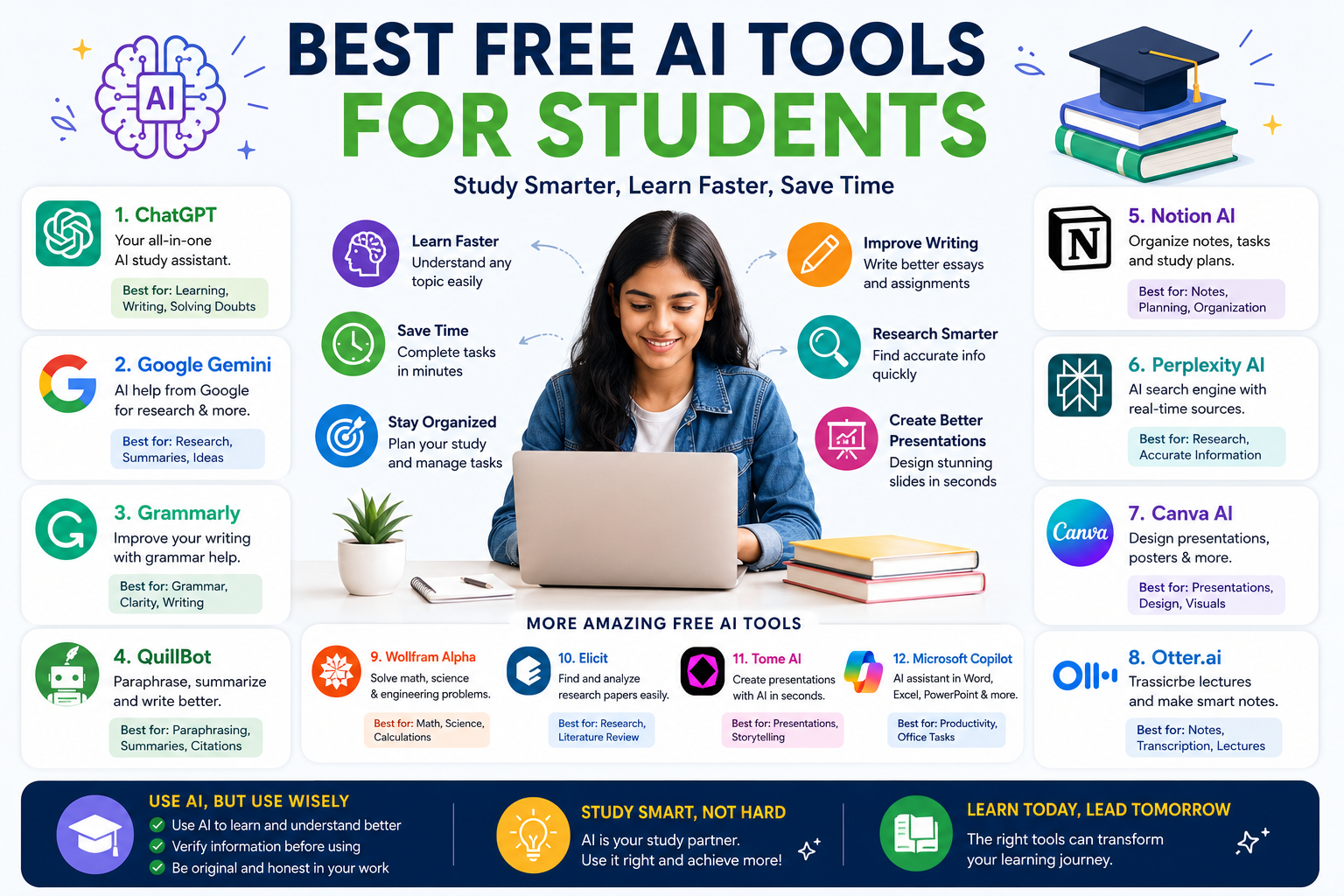
In this guide, we’ll explore the Best Free AI Tools for Students in 2026, including their features, benefits, and how they can improve your academic performance.
Why Students Are Using AI Tools More Than Ever
Modern education demands efficiency.
Students are expected to:
- Complete assignments
- Conduct research
- Prepare presentations
- Take notes
- Learn new concepts
- Manage deadlines
All at the same time.
AI tools help automate repetitive tasks and allow students to focus on learning rather than struggling with time-consuming processes.
Benefits include:
✅ Faster learning
✅ Better organization
✅ Improved writing skills
✅ Enhanced productivity
✅ Smarter research
✅ Reduced study time
Let’s look at the best free options available today.
1. ChatGPT – The Ultimate AI Study Assistant
If you’re looking for a versatile AI tool, ChatGPT is one of the best places to start.
Students use it for:
- Homework assistance
- Essay outlines
- Exam preparation
- Research support
- Concept explanations
- Coding help
- Language learning
Key Features
- Answers academic questions
- Explains difficult concepts simply
- Creates study plans
- Summarizes information
- Generates practice questions
Best For
Students who need an all-in-one AI learning assistant.
Free Version Benefits
The free plan offers enough functionality for most students’ daily study needs.
2. Google Gemini
Google Gemini has become a strong AI companion for students.
Its integration with Google services makes it especially useful for research and productivity.
Key Features
- Research assistance
- Writing support
- Content summarization
- Brainstorming ideas
- Google Workspace integration
Best For
Students already using Google Docs, Gmail, and Google Drive.
Why Students Like It
It provides quick access to information while staying connected to Google’s ecosystem.
3. Grammarly
Even brilliant ideas can lose impact because of grammar mistakes.
That’s where Grammarly helps.
Key Features
- Grammar correction
- Spelling suggestions
- Writing clarity improvements
- Tone adjustments
- Plagiarism checks (limited in free version)
Best For
- Essays
- Assignments
- Emails
- Reports
- Academic writing
Student Advantage
It helps students write professionally and confidently.
4. QuillBot
QuillBot has become one of the most popular AI writing tools among students.
Key Features
- Paraphrasing
- Summarization
- Grammar checking
- Citation assistance
- Sentence rewriting
Best For
Students working on:
- Research papers
- Assignments
- Academic content
Why It Matters
It helps improve writing quality while making content more concise and readable.
5. Notion AI
Organization is often the difference between average students and top performers.
Notion AI helps students stay organized.
Key Features
- Smart note-taking
- Task management
- Study planning
- Content generation
- Project organization
Best For
Students managing multiple subjects and deadlines.
Benefits
Instead of keeping notes scattered across apps, everything stays in one place.
6. Perplexity AI
Research is one of the biggest challenges students face.
Perplexity AI makes it easier.
Key Features
- AI-powered search
- Source citations
- Research assistance
- Quick summaries
- Accurate information retrieval
Best For
Research projects and academic assignments.
Student Advantage
Unlike many AI tools, Perplexity often provides source references, helping students verify information.
7. Canva AI
Creating presentations can take hours.
Canva AI helps students design professional presentations quickly.
Key Features
- AI presentation generation
- Graphic design assistance
- Posters
- Infographics
- Resume creation
Best For
Students preparing:
- Class presentations
- Project reports
- Portfolios
- Visual assignments
Why Students Love It
No graphic design experience is required.
8. Microsoft Copilot
Microsoft Copilot is becoming increasingly useful for students using Microsoft Office.
Key Features
- Writing support
- Research assistance
- Spreadsheet help
- Presentation creation
- Data analysis
Best For
Students working heavily with:
- Word
- Excel
- PowerPoint
Productivity Boost
It saves significant time during project preparation.
9. Otter.ai
Taking notes during lectures can be difficult.
Otter.ai solves this problem.
Key Features
- Real-time transcription
- Lecture recording
- Meeting summaries
- Voice-to-text conversion
Best For
Students attending:
- Online classes
- Seminars
- Workshops
- Group discussions
Major Benefit
You can focus on listening instead of constantly writing notes.
10. Wolfram Alpha
Wolfram Alpha remains one of the most powerful educational tools available.
Key Features
- Mathematics solutions
- Scientific calculations
- Engineering assistance
- Data analysis
- Formula explanations
Best For
Students studying:
- Mathematics
- Physics
- Engineering
- Statistics
Why It Stands Out
It doesn’t just provide answers—it often explains the process.
11. Elicit
Academic research can be overwhelming.
Elicit helps students review research papers more efficiently.
Key Features
- Research paper analysis
- Literature review support
- Academic question answering
- Research summaries
Best For
College and university students conducting serious research.
Student Advantage
It reduces the time spent searching through large volumes of academic literature.
12. Tome AI
Creating presentations from scratch takes time.
Tome AI speeds up the process.
Key Features
- AI-generated presentations
- Storytelling assistance
- Visual slide creation
- Content structuring
Best For
Students preparing project presentations.
Why It Helps
Students can focus on content rather than design.
How Students Can Use AI Responsibly
AI is a powerful assistant.
But it shouldn’t replace learning.
The smartest students use AI to:
✅ Understand concepts
✅ Improve productivity
✅ Organize information
✅ Save time
Not to:
❌ Copy assignments blindly
❌ Submit AI-generated content without review
❌ Avoid learning the subject
Always verify information before using it in academic work.
AI Tools for Different Student Needs
For Writing Assignments
- ChatGPT
- Grammarly
- QuillBot
For Research
- Perplexity AI
- Elicit
- Google Gemini
For Presentations
- Canva AI
- Tome AI
For Mathematics
- Wolfram Alpha
- ChatGPT
For Productivity
- Notion AI
- Microsoft Copilot
For Note-Taking
- Otter.ai
- Notion AI
Tips to Get the Most Out of AI Tools
Ask Better Questions
The quality of your prompt affects the quality of results.
Verify Information
Always cross-check important facts.
Combine Multiple Tools
Use ChatGPT for explanations, Grammarly for editing, and Canva AI for presentations.
Stay Organized
Create a dedicated workflow for assignments and projects.
Learn Alongside AI
Use AI as a tutor, not a replacement for studying.
The Future of AI in Education
AI is rapidly becoming part of everyday education.
Future tools will likely offer:
- Personalized tutoring
- Adaptive learning paths
- Real-time feedback
- Interactive learning experiences
- Smarter research assistance
Students who learn how to use AI effectively today will have a significant advantage tomorrow.
Frequently Asked Questions
Are AI tools free for students?
Many AI tools offer free plans with useful features. Some also provide premium versions with advanced functionality.
Can students use AI for homework?
Yes. AI can help explain concepts, solve problems, and improve understanding. Students should still complete their own work and verify information.
Which AI tool is best for research?
Perplexity AI, Google Gemini, and Elicit are excellent choices for research-related tasks.
What is the best AI tool for writing assignments?
ChatGPT, Grammarly, and QuillBot are among the most popular options for improving academic writing.
Final Thoughts
Artificial Intelligence is no longer a future technology.
It’s already helping millions of students study more efficiently.
From writing essays and solving math problems to conducting research and creating presentations, AI tools can dramatically improve productivity when used correctly.
The best approach is simple:
Use AI to support your learning.
Not replace it.
Whether you’re preparing for school exams, college assignments, competitive tests, or professional certifications, these tools can help you save time, reduce stress, and perform better academically.
Start with a few tools from this list, experiment with their features, and build a study system that works for you.
The students who learn how to use AI effectively today will be the ones leading tomorrow.