Planning to build a website?
One of the first decisions you’ll face is choosing the right platform.
Two of the most popular options are WordPress and Wix.
Both can help you create a professional website.
Both offer templates, customization options, and business features.
But they are very different when it comes to flexibility, SEO, pricing, performance, and long-term growth.
So which one should you choose?
The answer depends on your goals.
In this complete WordPress vs Wix Comparison Guide, we’ll compare both platforms across every important factor including ease of use, SEO, customization, blogging, eCommerce, pricing, and scalability.
By the end, you’ll know exactly which platform is right for your website.
What Is WordPress?
WordPress is the world’s most popular Content Management System (CMS).
It powers over 40% of all websites on the internet.
With WordPress, you have complete control over your website.
You can build:
- Blogs
- Business websites
- eCommerce stores
- Portfolios
- News websites
- Membership sites
Popular WordPress Features
✅ Thousands of themes
✅ Thousands of plugins
✅ Advanced SEO capabilities
✅ Full website ownership
✅ Unlimited customization
WordPress is known for its flexibility.
What Is Wix?
Wix is a website builder designed for simplicity.
It provides an all-in-one platform where hosting, templates, and website management are included.
Users can create websites using a drag-and-drop editor.
Popular Wix Features
✅ Easy setup
✅ Built-in hosting
✅ Drag-and-drop design
✅ Beginner-friendly interface
✅ No coding required
Wix focuses on simplicity and convenience.
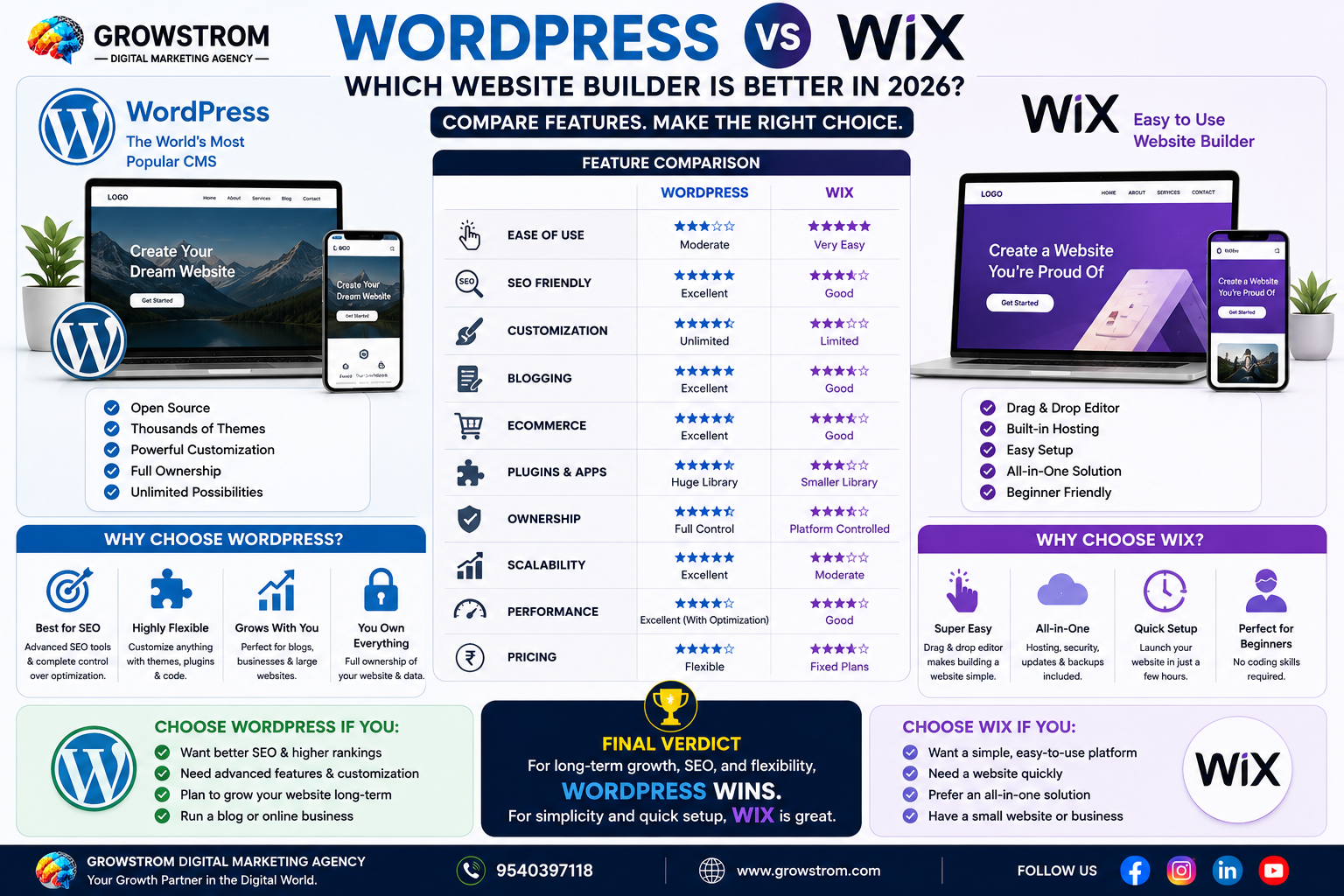
WordPress vs Wix: Quick Comparison
| Feature | WordPress | Wix |
|---|---|---|
| Ease of Use | Moderate | Very Easy |
| SEO | Excellent | Good |
| Customization | Unlimited | Limited |
| Blogging | Excellent | Good |
| eCommerce | Excellent | Good |
| Plugins & Apps | Massive Library | Smaller Library |
| Ownership | Full Control | Platform Controlled |
| Scalability | Excellent | Moderate |
| Performance | Excellent | Good |
| Long-Term Growth | Excellent | Moderate |
Let’s examine each category in detail.
Ease of Use
For beginners, ease of use matters.
Wix
Wix is built for non-technical users.
You can:
- Choose a template
- Drag elements onto pages
- Publish quickly
No coding knowledge is required.
Advantages
- Beginner-friendly
- Fast setup
- Simple interface
Best For
Small websites and beginners.
WordPress
WordPress has a learning curve.
You’ll need to understand:
- Hosting
- Themes
- Plugins
- Updates
However, page builders like Elementor make WordPress significantly easier.
Advantages
- More flexibility
- More control
Best For
Users planning long-term growth.
Winner
Wix
For pure simplicity, Wix wins.
Design and Customization
Your website should reflect your brand.
Customization is important.
Wix Design Options
Wix offers many attractive templates.
However:
- Customization has limits
- Template switching can be difficult
- Advanced changes are restricted
WordPress Design Options
WordPress offers:
- Thousands of themes
- Elementor
- Gutenberg
- Custom development
You can design almost anything.
Benefits
- Unlimited flexibility
- Complete design freedom
Winner
WordPress
The customization possibilities are virtually endless.
SEO Comparison
SEO is one of the most important factors when choosing a website platform.
Especially if you want traffic from Google.
WordPress SEO
WordPress is widely considered one of the best SEO platforms available.
Popular SEO plugins include:
- Rank Math
- Yoast SEO
- SEOPress
SEO Features
- Custom URLs
- Meta tags
- Schema markup
- XML sitemaps
- Advanced optimization
Why SEO Professionals Prefer WordPress
Greater control over optimization.
Wix SEO
Wix has improved significantly over the years.
SEO Features
- Meta tags
- Sitemap generation
- Basic optimization tools
However, advanced SEO flexibility remains more limited.
Winner
WordPress
For serious SEO and organic traffic growth, WordPress is the stronger option.
Blogging Capabilities
Blogs help drive traffic and build authority.
WordPress Blogging
WordPress originally started as a blogging platform.
It remains one of the best solutions for content publishing.
Features
- Categories
- Tags
- SEO optimization
- Content management
Best For
Content-heavy websites.
Wix Blogging
Wix includes blogging features.
However:
- Fewer advanced options
- Less flexibility
Winner
WordPress
Bloggers and content marketers typically prefer WordPress.
eCommerce Comparison
Planning to sell products online?
Let’s compare.
WordPress + WooCommerce
WooCommerce powers millions of online stores.
Features
- Product management
- Payment gateways
- Inventory tracking
- Shipping management
Benefits
Highly scalable.
Wix eCommerce
Wix offers built-in eCommerce functionality.
Good For
- Small stores
- Beginners
Limitations
Less flexibility as stores grow.
Winner
WordPress
Especially for growing online businesses.
Plugin and App Ecosystem
Extensions add functionality.
WordPress Plugins
Over 60,000 plugins available.
Examples:
- Rank Math SEO
- Elementor
- WPForms
- LiteSpeed Cache
You can add nearly any feature.
Wix Apps
Wix App Market offers useful integrations.
However, the selection is much smaller.
Winner
WordPress
The plugin ecosystem is unmatched.
Website Speed and Performance
Website speed impacts:
- User experience
- SEO
- Conversions
WordPress Performance
Performance depends on:
- Hosting
- Optimization
- Plugins
With proper setup, WordPress can be extremely fast.
Wix Performance
Wix handles hosting automatically.
Performance is generally reliable.
However, advanced optimization options are limited.
Winner
WordPress
When optimized correctly.
Pricing Comparison
Budget matters.
Let’s compare costs.
Wix Pricing
Wix includes:
- Hosting
- Security
- Maintenance
Monthly subscription required.
Benefits
Predictable pricing.
WordPress Pricing
Costs vary based on:
- Hosting
- Domain
- Premium themes
- Plugins
Advantages
More flexibility.
You only pay for what you need.
Winner
Depends on requirements.
For flexibility, WordPress wins.
For simplicity, Wix wins.
Security
Website security is essential.
Wix Security
Wix handles:
- Security updates
- Hosting management
- Platform maintenance
Users have little responsibility.
WordPress Security
WordPress requires:
- Updates
- Security plugins
- Maintenance
However, excellent security is achievable.
Winner
Wix
Less maintenance required.
Ownership and Control
This factor is often overlooked.
Wix
You operate within the Wix ecosystem.
Platform restrictions apply.
WordPress
You own:
- Website files
- Database
- Hosting
Complete control.
Winner
WordPress
Full ownership provides greater freedom.
Scalability
Can the platform grow with your business?
Wix Scalability
Good for:
- Small businesses
- Personal websites
May become restrictive for larger projects.
WordPress Scalability
Powers:
- Small blogs
- Enterprise websites
- Major news publications
Growth potential is virtually unlimited.
Winner
WordPress
Ideal for long-term expansion.
WordPress vs Wix for Local Businesses
If you’re running:
- A clinic
- A digital marketing agency
- A local service business
- A restaurant
SEO is critical.
WordPress provides stronger Local SEO capabilities.
For example, agencies like Growstrom Digital Marketing Agency often recommend WordPress because it offers greater control over SEO, website performance, and lead-generation strategies.
Pros and Cons of WordPress
Pros
✅ Excellent SEO
✅ Unlimited customization
✅ Full ownership
✅ Massive plugin ecosystem
✅ Strong blogging platform
✅ Powerful eCommerce capabilities
Cons
❌ Learning curve
❌ Requires maintenance
❌ Hosting setup needed
Pros and Cons of Wix
Pros
✅ Easy to use
✅ Fast setup
✅ Built-in hosting
✅ Beginner-friendly
✅ Minimal maintenance
Cons
❌ Limited flexibility
❌ Fewer SEO options
❌ Smaller app ecosystem
❌ Less scalability
Who Should Choose WordPress?
Choose WordPress if you:
- Want better SEO
- Plan to blog regularly
- Need advanced customization
- Want long-term growth
- Run a business website
- Need eCommerce flexibility
WordPress is ideal for ambitious projects.
Who Should Choose Wix?
Choose Wix if you:
- Need a simple website quickly
- Have no technical experience
- Want an all-in-one solution
- Prefer minimal maintenance
Wix is great for beginners.
Frequently Asked Questions
Is WordPress better than Wix for SEO?
Yes. WordPress offers more advanced SEO tools, plugins, and optimization options.
Which platform is easier for beginners?
Wix is generally easier because of its drag-and-drop interface and built-in hosting.
Is WordPress cheaper than Wix?
It depends. WordPress offers flexible pricing, while Wix uses subscription plans.
Which platform is better for business websites?
WordPress is usually the better choice because of its scalability, SEO capabilities, and customization options.
Final Verdict: WordPress vs Wix
Both WordPress vs Wix are excellent website-building platforms.
Wix wins when it comes to simplicity.
It’s beginner-friendly, easy to manage, and quick to launch.
WordPress wins in nearly every other category.
It offers better SEO, more customization, greater scalability, stronger blogging features, and complete ownership of your website.
If you’re building a personal website and want something simple, Wix may be enough.
But if you’re serious about growing traffic, generating leads, ranking on Google, or building a long-term online business, WordPress is usually the better investment.
That’s why most SEO professionals, marketers, bloggers, and growing businesses continue to choose WordPress as their preferred platform in 2026.
WordPress vs Wix WordPress vs Wix WordPress vs Wix WordPress vs Wix WordPress vs Wix WordPress vs Wix WordPress vs Wix WordPress vs Wix WordPress vs Wix WordPress vs Wix WordPress vs Wix WordPress vs Wix WordPress vs Wix WordPress vs Wix

Digital Marketing Strategist at Growstrom
Prashant Kumar is a Digital Marketing Strategist at Growstrom, specializing in SEO, Local SEO, Google Ads, Meta Ads, and digital marketing strategies. He works on practical search optimization and lead-generation strategies to help businesses improve their online visibility, website traffic, and qualified leads.