
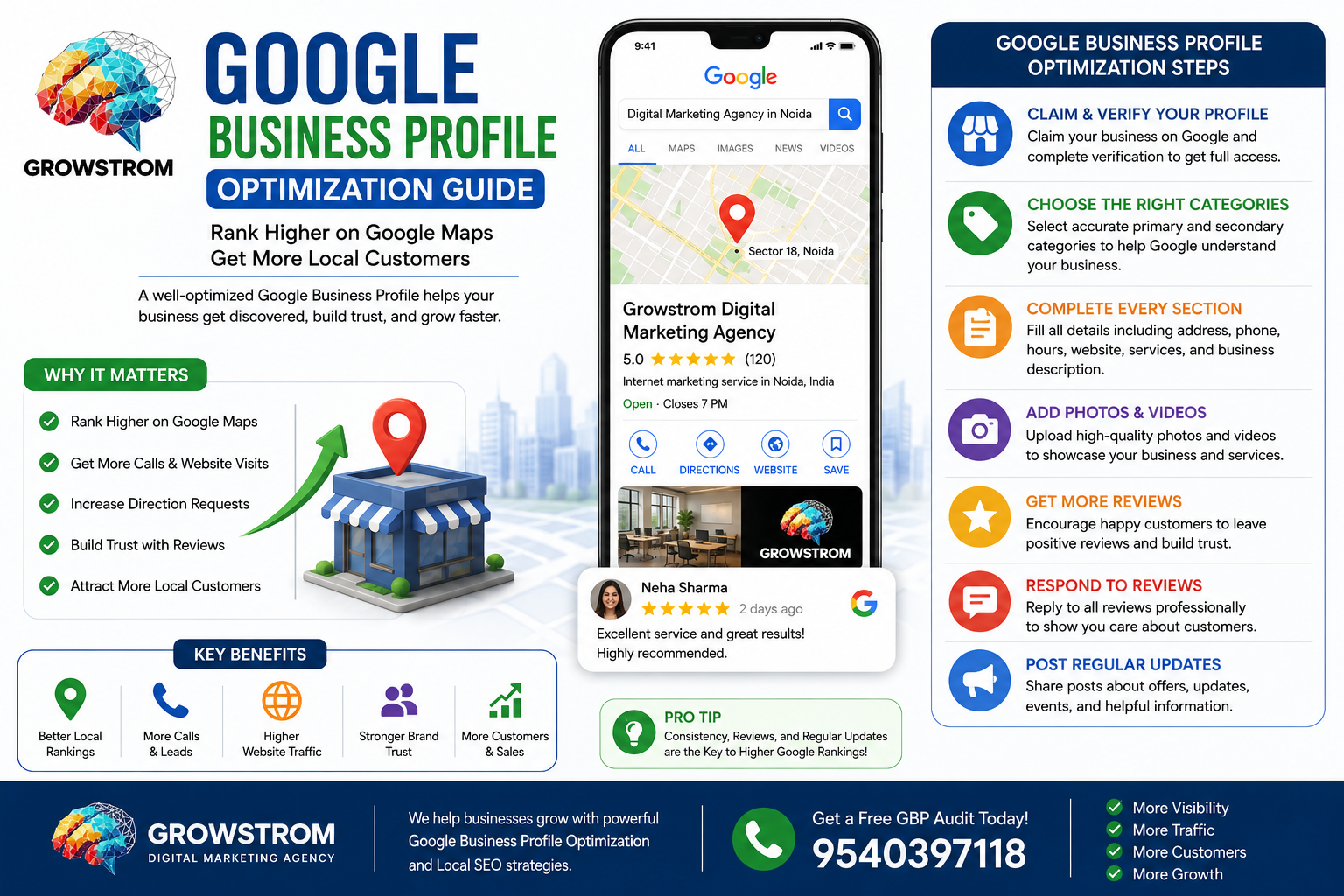
If your business isn’t showing up on Google Maps, you’re missing customers every single day.
Think about it.
When someone needs a nearby service, they don’t open a phone book. They don’t drive around looking for options.
They search Google.
Whether it’s a dentist, restaurant, digital marketing agency, gym, salon, or local service provider, Google Maps has become the first place customers look.
The challenge?
Most businesses create a Google Business Profile and then forget about it and did not do Google Business Profile Optimization.
As a result, their competitors appear higher in search results, receive more calls, get more website visits, and attract more customers.
The good news is that you don’t need a massive marketing budget to compete.
You simply need a properly optimized Google Business Profile Optimization.
In this complete guide, you’ll learn exactly how to optimize your profile, improve local visibility, rank higher on Google Maps, and generate more leads for your business.
What Is Google Business Profile?
Google Business Profile (formerly Google My Business) is a free tool from Google that allows businesses to manage how they appear in:
- Google Search
- Google Maps
- Local Search Results
When someone searches for your business or a related service, your profile may display:
- Business name
- Phone number
- Website
- Directions
- Photos
- Reviews
- Operating hours
- Products and services
For local businesses, this is often the first impression customers get.
A strong profile can generate leads without customers even visiting your website.
Why Google Business Profile Optimization Matters
Many business owners underestimate how powerful Google Business Profile Optimization can be.
But consider this:
Local searches usually come from people who are actively looking for a solution.
These users often have high buying intent.
That means they are more likely to call, visit, or make a purchase.
Benefits of Optimizing Your Profile
A properly optimized profile can help:
- Increase local visibility
- Generate more phone calls
- Drive website traffic
- Improve map rankings
- Increase direction requests
- Build customer trust
- Boost local conversions
For businesses in Noida, Delhi NCR, and across India, this can become one of the highest ROI marketing channels available.
How Google Determines Local Rankings
Google uses three primary ranking factors.
Understanding these factors helps you optimize effectively.
Relevance
How closely your business matches the search query.
For example:
If someone searches for “SEO agency in Noida,” Google wants to show businesses clearly related to SEO services.
The more complete and accurate your profile is, the easier it becomes for Google to understand your business.
Distance
How close your business is to the searcher.
Location matters.
While you can’t change your physical address, you can optimize everything else to improve visibility.
Prominence
This measures how well-known and trusted your business is online.
Google evaluates:
- Reviews
- Citations
- Website authority
- Backlinks
- Brand mentions
- User engagement
Prominent businesses generally rank higher.
Step 1: Claim and Verify Your Google Business Profile
Before optimization begins, you need ownership.
Claim Your Business
Visit Google Business Profile and search for your business.
If it already exists:
- Request ownership
- Complete verification
If it doesn’t exist:
- Create a new profile
Complete Verification
Google may verify using:
- Postcard
- Phone
- Video verification
Verification is essential.
Without it, your profile won’t have full visibility or control.
Step 2: Choose the Right Business Categories
This step is often overlooked.
Yet it directly impacts rankings.
Select a Primary Category
Your primary category should describe your main service.
Examples:
- Digital Marketing Agency
- Dentist
- Restaurant
- Real Estate Consultant
- Lawyer
Add Relevant Secondary Categories
These help Google understand additional services.
For example, a digital marketing agency may include:
- SEO Agency
- Advertising Agency
- Marketing Consultant
- Website Designer
Choose categories carefully.
Don’t add irrelevant options.
Accuracy wins.
Step 3: Complete Every Profile Section
Google prefers complete profiles.
Incomplete profiles lose ranking opportunities.
Fill Out:
Business Name
Use your real business name.
Avoid keyword stuffing.
Bad Example:
Growstrom Digital Marketing Agency Best SEO Company Noida
Good Example:
Growstrom Digital Marketing Agency
Address
Use an accurate physical location.
Ensure consistency everywhere online.
Phone Number
Use a local number whenever possible.
Website URL
Link directly to your website.
Business Hours
Keep hours updated.
Especially during holidays.
Business Description
Use all available space wisely.
Explain:
- What you do
- Who you serve
- Service areas
- Unique advantages
Include relevant local keywords naturally.
Step 4: Write an SEO-Friendly Business Description
Your business description helps Google and customers understand your services.
A strong description should include:
- Core services
- Service locations
- Unique value proposition
- Industry expertise
Example:
“Growstrom Digital Marketing Agency helps businesses across Noida and India improve online visibility through SEO, Local SEO, Google Business Profile Optimization , website design, and digital marketing solutions. Our goal is to help businesses attract more leads, increase local rankings, and grow revenue.”
Keep it natural.
Avoid excessive keywords.
Step 5: Upload High-Quality Photos
Photos significantly influence customer decisions.
Businesses with photos often receive more engagement than those without them.
Upload:
- Office photos
- Team photos
- Exterior images
- Interior images
- Service photos
- Product photos
- Before-and-after results
Photo Best Practices
Use:
- High resolution
- Real business images
- Good lighting
- Recent photos
Avoid stock images whenever possible.
Authenticity builds trust.
Step 6: Collect More Customer Reviews
Reviews are one of the strongest local ranking signals.
They also influence purchasing decisions.
Most customers read reviews before contacting a business.
Why Reviews Matter
Reviews improve:
- Trust
- Rankings
- Click-through rates
- Conversions
How to Get More Reviews
Ask every satisfied customer.
Use:
- SMS
- QR codes
- Follow-up messages
Make the process simple.
The easier it is, the more reviews you’ll receive.
Step 7: Respond to Every Review
Many businesses collect reviews.
Few respond consistently.
That’s a mistake.
Google wants active businesses.
Positive Reviews
Thank customers.
Mention the service provided when appropriate.
Example:
“Thank you for choosing Growstrom Digital Marketing Agency. We’re glad our Local SEO services helped improve your Google rankings.”
Negative Reviews
Stay professional.
Never argue.
Address concerns and offer solutions.
Potential customers often judge your responses more than the review itself.
Step 8: Publish Google Business Profile Optimization Posts
Google Posts function like mini social media updates.
They help keep your profile active.
Post Ideas
- New services
- Special offers
- Business updates
- Blog articles
- Customer success stories
- Industry tips
Posting regularly sends positive engagement signals.
Aim for at least one post each week.
Step 9: Add Products and Services
Many businesses skip this feature.
Big mistake.
Adding services helps Google understand what you offer.
Service Examples
For a digital marketing agency:
- Local SEO Services
- Google Business Profile Optimization
- Website Design
- Search Engine Optimization
- Content Marketing
Include descriptions for each service.
The more information Google has, the better.
Step 10: Optimize for Google Maps Rankings
Many business owners ask:
“How do I rank higher on Google Maps?”
The answer involves multiple factors working together.
Google Maps Ranking Checklist
Complete Profile
Fill out every section.
Consistent Business Information
Maintain the same:
- Business Name
- Address
- Phone Number
Across all directories.
Positive Reviews
Consistently generate authentic customer feedback.
Quality Website
Your website should support your local SEO efforts.
Local Citations
Build listings on trusted directories.
Ongoing Activity
Continue posting, updating photos, and responding to reviews.
Google rewards active businesses.
Common Google Business Profile Optimization Mistakes
Avoid these mistakes if you want better rankings.
Keyword Stuffing Business Name
This violates Google’s guidelines.
Fake Reviews
Google can remove them.
Inconsistent Information
Different addresses or phone numbers create confusion.
Ignoring Reviews
Customers notice.
Google notices too.
Inactive Profiles
Stale profiles often lose visibility.
Poor Quality Images
Low-quality photos reduce trust.
Advanced Google Business Profile Optimization Tips
Once the basics are complete, focus on advanced strategies.
Create Local Landing Pages
Build pages targeting:
- SEO Services in Noida
- Local SEO Services in Delhi NCR
- Digital Marketing Agency in Noida
Link these pages to your profile.
Build Local Backlinks
Earn mentions from:
- Local blogs
- Industry websites
- News publications
- Business associations
Use UTM Tracking
Track profile-generated traffic inside Google Analytics.
This helps measure ROI accurately.
Add Fresh Photos Monthly
Google loves activity.
Regular updates improve engagement.
Why Professional Google Business Profile Optimization Matters
Many businesses set up a profile.
Very few optimize it properly.
That difference often determines who appears in the top three map results.
Professional optimization focuses on:
- Category selection
- Keyword relevance
- Review management
- Local citation building
- Google Maps rankings
- Ongoing profile growth
That’s where expert guidance can make a significant difference.
How Growstrom Digital Marketing Agency Helps Businesses Rank Higher
At Growstrom Digital Marketing Agency, we help businesses improve local visibility and attract qualified customers through strategic Google Business Profile optimization.
Our services include:
Google Business Profile Setup
Complete setup and verification support.
Profile Optimization
Category selection, service optimization, keyword integration, and profile enhancement.
Review Management
Systems designed to generate more authentic customer reviews.
Local Citation Building
Improving business authority across trusted directories.
Google Maps Ranking Strategies
Helping businesses improve local visibility and generate more leads.
Ongoing Local SEO Support
Continuous optimization designed to improve long-term performance.
Whether you’re a local business in Noida, a service provider in Delhi NCR, or a growing company anywhere in India, Growstrom can help you maximize the value of your Google Business Profile.
Final Thoughts
Your Google Business Profile is often the most valuable local marketing asset your business owns.
Customers are searching every day.
The question isn’t whether people are looking for your services.
The question is whether they’re finding you.
A fully optimized profile can increase visibility, improve trust, generate more calls, and drive consistent business growth.
By implementing the strategies in this guide, you’ll be in a much stronger position to compete in local search results and Google Maps.
If you want faster results and a customized strategy, contact Growstrom Digital Marketing Agency today for a free Google Business Profile Optimization audit and discover the opportunities hiding inside your local search presence.

Digital Marketing Strategist at Growstrom
Prashant Kumar is a Digital Marketing Strategist at Growstrom, specializing in SEO, Local SEO, Google Ads, Meta Ads, and digital marketing strategies. He works on practical search optimization and lead-generation strategies to help businesses improve their online visibility, website traffic, and qualified leads.
